
Submit your event
Our supporters can post their events on our community calendar.
If you're a supporter of Rockton-Roscoe News, we can arrange for you to post your event on our community calendar. You can also post an announcement or opinion. Thanks to the Duplicate feature, you can make copies of regular events - just change the date.
Your post could be seen by hundreds, even thousands, of readers in Rockton, Roscoe, and South Beloit.
We appreciate the financial support of our community members. If supporting us is a hardship for you, let us know and we can make an exception.
If you'd like to submit events to our calendar, contact us at [email protected] and we can set you up so you can log in or post at https://rockton-roscoe-news.ghost.io/ghost/#/editor/post.
Note: content needs to follow our editorial guidelines, so once you're done, your post will remain as a Draft until one of our editors publishes it for you, usually the same day.
You can use the format of the events on our calendar as examples. Here's one: Spanish Conversation Club.
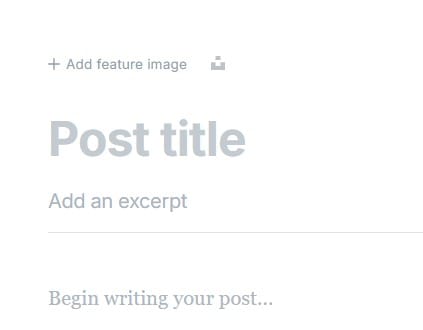
- First, add a feature image. At the top of the screen, upload an image from your computer or phone by clicking on the plus sign, where it says "Add feature image." Or if you don't have an image, click the icon on the right to find a nice image from Unsplash.
- Add your post title - the name of your event. Our events use title case, capitalizing each word.
- Add the date, time, and location of your event where it says "Add an excerpt." Add it in that order, so Google can understand it better. Include the year too. Example: Mon, Nov 11, 2024 4:00 pm, Talcott Free Library, 101 E. Main St. Rockton IL, 61072
- When you're done, tap Save at the bottom. You can come back and make changes later from your Dashboard.
- Bonus: you can duplicate a previous event by right-clicking on the title in the Dashboard and choosing Duplicate. Then just update the appropriate details. You can find Advanced Tips below.
As I said, your event could be seen by thousands of people in Rockton, Roscoe, and South Beloit, in Google searches and even in Google News. We often feature events in our social media - also seen by thousands.
Advanced tips
You can help us out by making three optional changes on the Settings tab (the icon on the upper right). Otherwise, we can do it after you submit your event.
- Under Tags, choose "Events." You can also choose the name of your town.
- Change the Publish Date to one week ago, so your event can appear in the Latest section.
- Under Code Injection, put your event date into the Page Footer as a four digit year, two digit month and two digit day. For example, Dec. 24, 2025 would be 2025-12-24.
 2024-12-24